MR
To Marisol R.
Written for her
You walked 412 Alder twice — the second time you went back to the kitchen. Two doors down just listed with the same floor plan and a finished basement. Want Thursday?

Eidice answers every lead in your tone and keeps your leads, inbox, calendar and marketing in one simple place. The ones ready to talk come straight to you.

Priya Shah wants to see Elm Ave on Saturday morning. Showing requests come straight to you, with her whole file one tap away.
Example on Eidice AI, with auto-replies on. Prefer to approve first? Every reply waits for your tap.
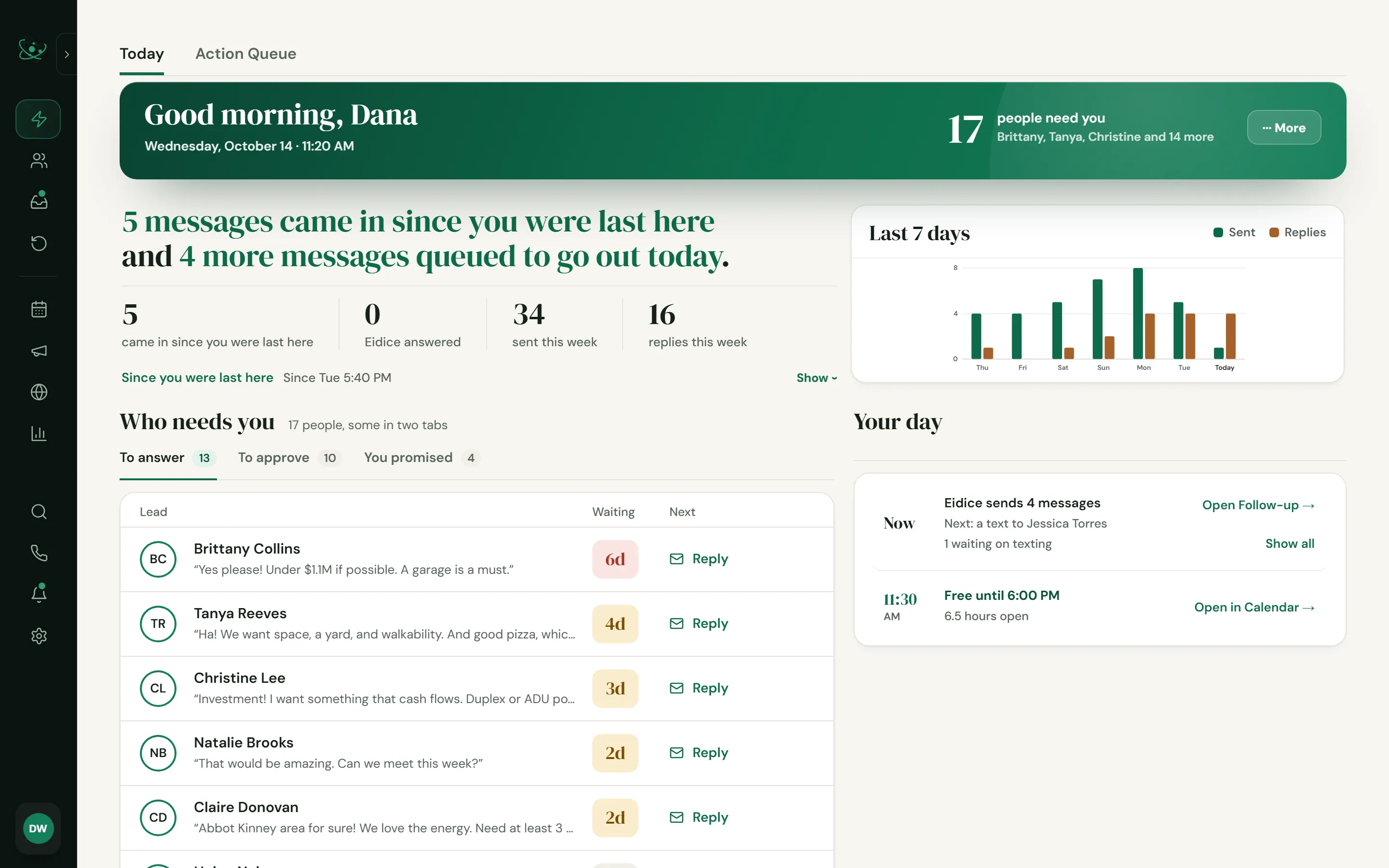
of online home inquiries got no reply at all in a 2024 secret-shopper study. The replies that did come took 8 hours 17 minutes on average.
Mike DelPrete, 2024of sellers hire the first agent they talk to. So do 47% of buyers. Whoever answers first is usually the one who gets the deal.
Zillow Consumer Housing Trends Report, 2025of repeat buyers went back to their last agent, even though 91% of buyers say they'd use or recommend theirs again.
NAR Profile of Home Buyers and Sellers, 2025Eidice closes all three gaps. It answers fast, it never lets a lead go quiet, and it keeps your past clients hearing from you.
Most AI follow-up sounds like AI. Eidice AI writes from what each person actually told you, their budget, their neighborhoods, their must-haves, in your words.
Hi {First Name}, just checking in! Let me know if you have any questions about the market.
The same sentence goes to every lead on the list.
Hi Brittany, checking in on the search. Still aiming for under $1.1M, with the garage as a must? If anything has changed, tell me and I'll adjust what I send you. And if you'd like to see a few this weekend, I'll set it up.
Written from Brittany's own words: "Under $1.1M if possible. A garage is a must."
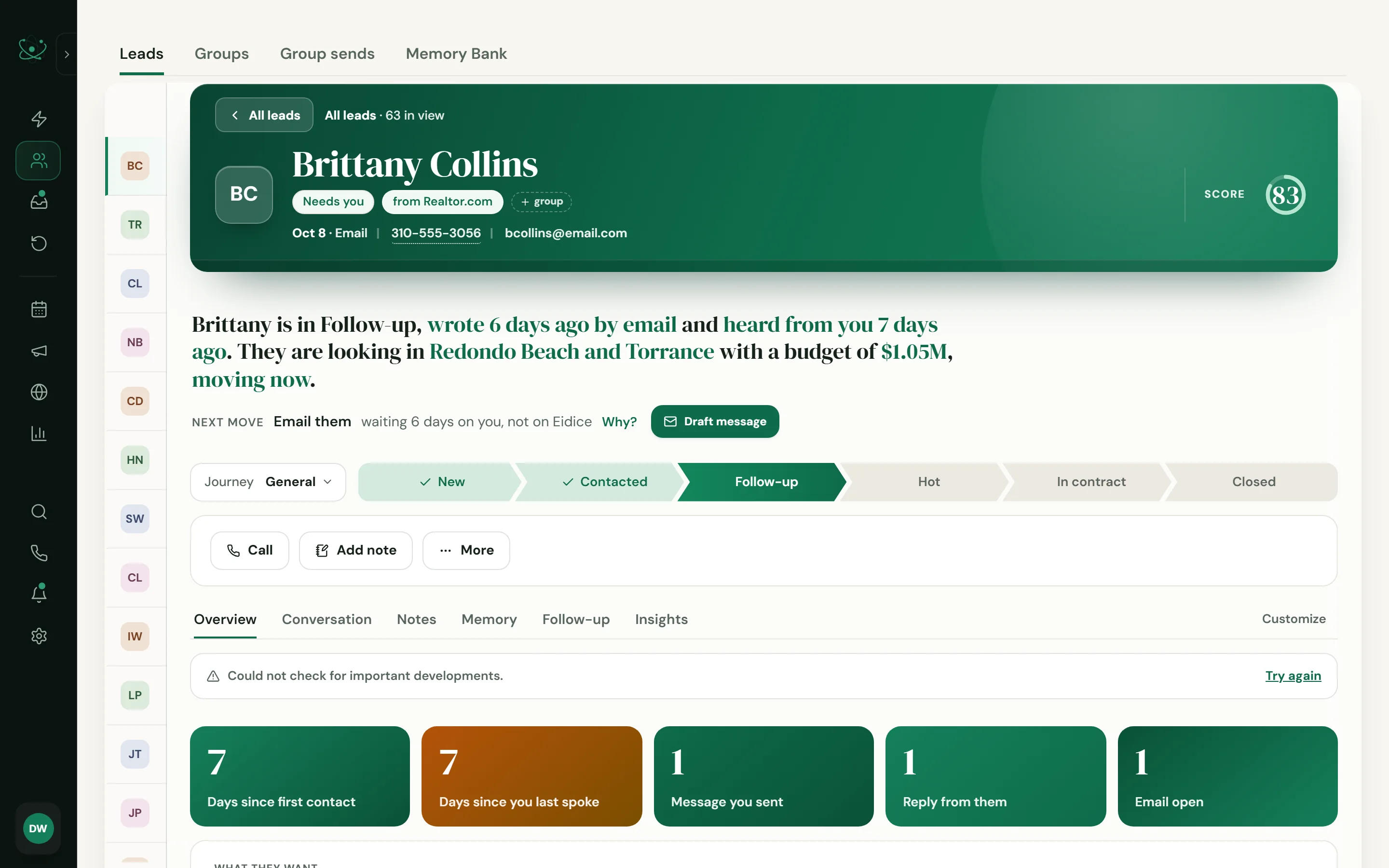
Being first only counts if they write back. A reply about the home they asked about, in your words, is the one they answer.
On Eidice AI, start with every draft waiting for you. Turn on auto-replies when you trust it. Switch back anytime.
The routine replies come off your plate. The conversations that decide a deal stay yours.
Most leads aren't ready the day they reach out. Put each one on a plan and Eidice keeps in touch for as long as it takes: new listings, check-ins, market updates, each message ready on time. When they write back, the plan stops and the conversation is yours.
12 plans ready to use
A lead who isn't ready today is next season's client. A plan keeps you in front of every one of them, so when they're ready, you're the agent they already know.
When a lead mentions a special event, like a birthday, a move or a closing date, Eidice spots it in their message and asks you once: add it to your calendar, or set a reminder. And your birthday and home-anniversary plan has the note ready on the day.
On Plus and Eidice AI.
Nine in ten buyers would use their agent again or recommend them, yet only 18% of repeat buyers went back to the same agent (NAR, 2025). Remembering the birthday and the day they got the keys is how you stay the agent they call, and the one they send friends to.
Every email and call with a person in one thread, with the reply already written in your tone. On Eidice AI, the Inbox Organizer pulls out what matters: showing requests, questions you owe an answer, facts worth keeping.
Every email and call with a person in one thread, with their story beside it.
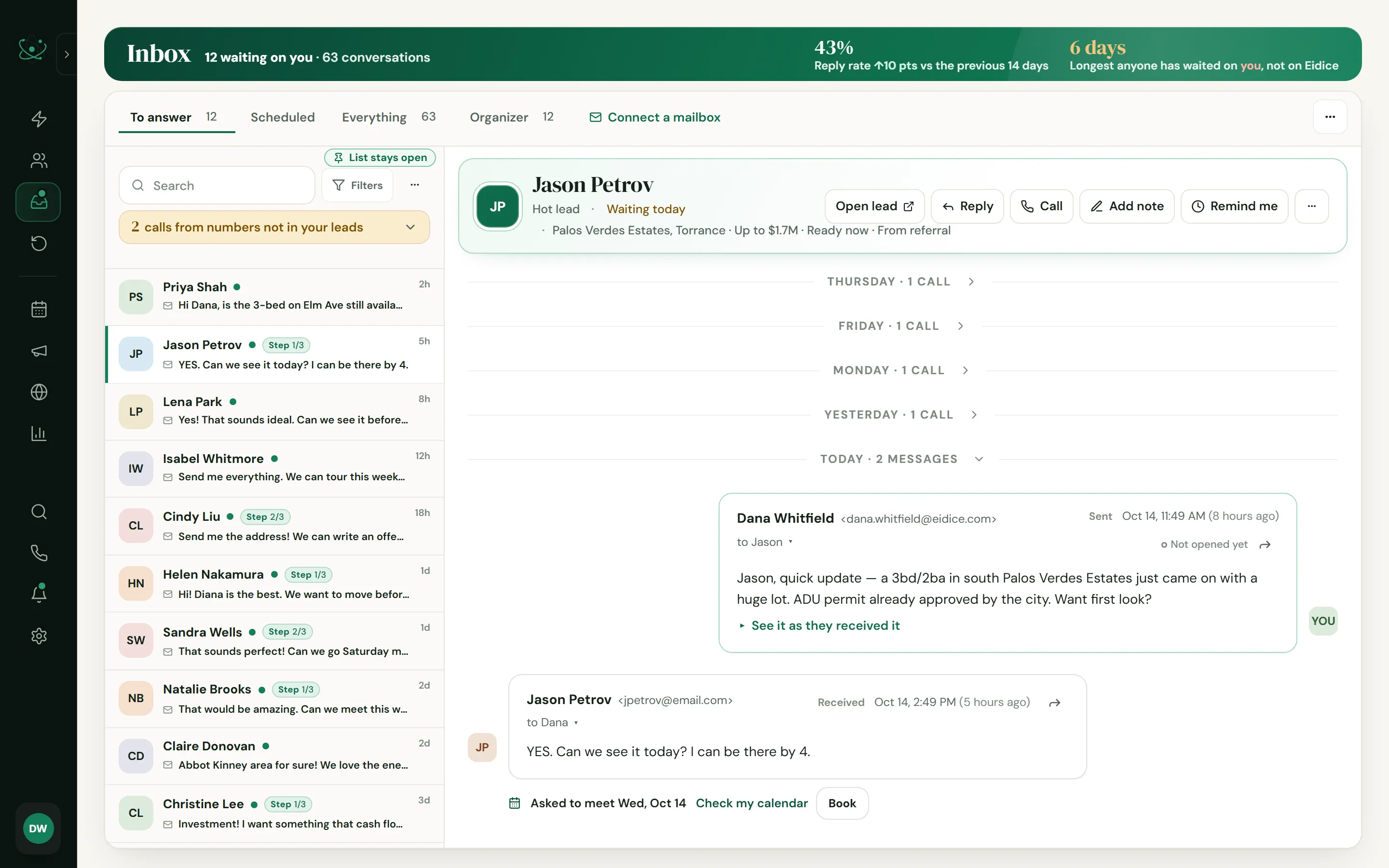
Nothing that matters gets buried. The showing request under forty newsletters gets seen today, and what each person tells you lands on their record.
Send one email to your whole list, and Eidice writes each one for the person getting it, from what they told you and asked about: their budget, their neighborhoods, the home they wanted. The tone, the length and what it may mention are up to you. You read every draft, change what you want, and send.
Every draft waits for you. Nothing leaves until you say so.
You walked 412 Alder twice — the second time you went back to the kitchen. Two doors down just listed with the same floor plan and a finished basement. Want Thursday?
Everything you saved is under $850k on the east side, and that shelf got thinner this week. Two came back down into it yesterday. Want them as they land?
Elm Ave came down $40k on Tuesday. You asked me about that one in March — it is now inside the range you gave me. Still interested?
“Hi {{First}}, just checking in! Let me know if you’re still looking.”
— and 1,239 people get the same sentence.
1,240 emails, each one about the home that person actually walked through. Same three minutes of your time.
Your whole list hears from you in one sitting, and each person reads a note about their own search. That's how a quiet database turns back into conversations.
No separate website builder and no design app. Eidice makes both in your brand, and everything they bring in lands with your leads.
Find your place in the South Bay.
New website leadAva Chen asked about the Torrance home. A first reply is drafted.Your own site in your brand, with homes for sale from your MLS that buyers can search. Everyone who reaches out lands in Eidice as a lead, with a first reply drafted.
Included on Eidice AI, on your own domain.
Your website stops being a brochure and becomes a lead source of its own.
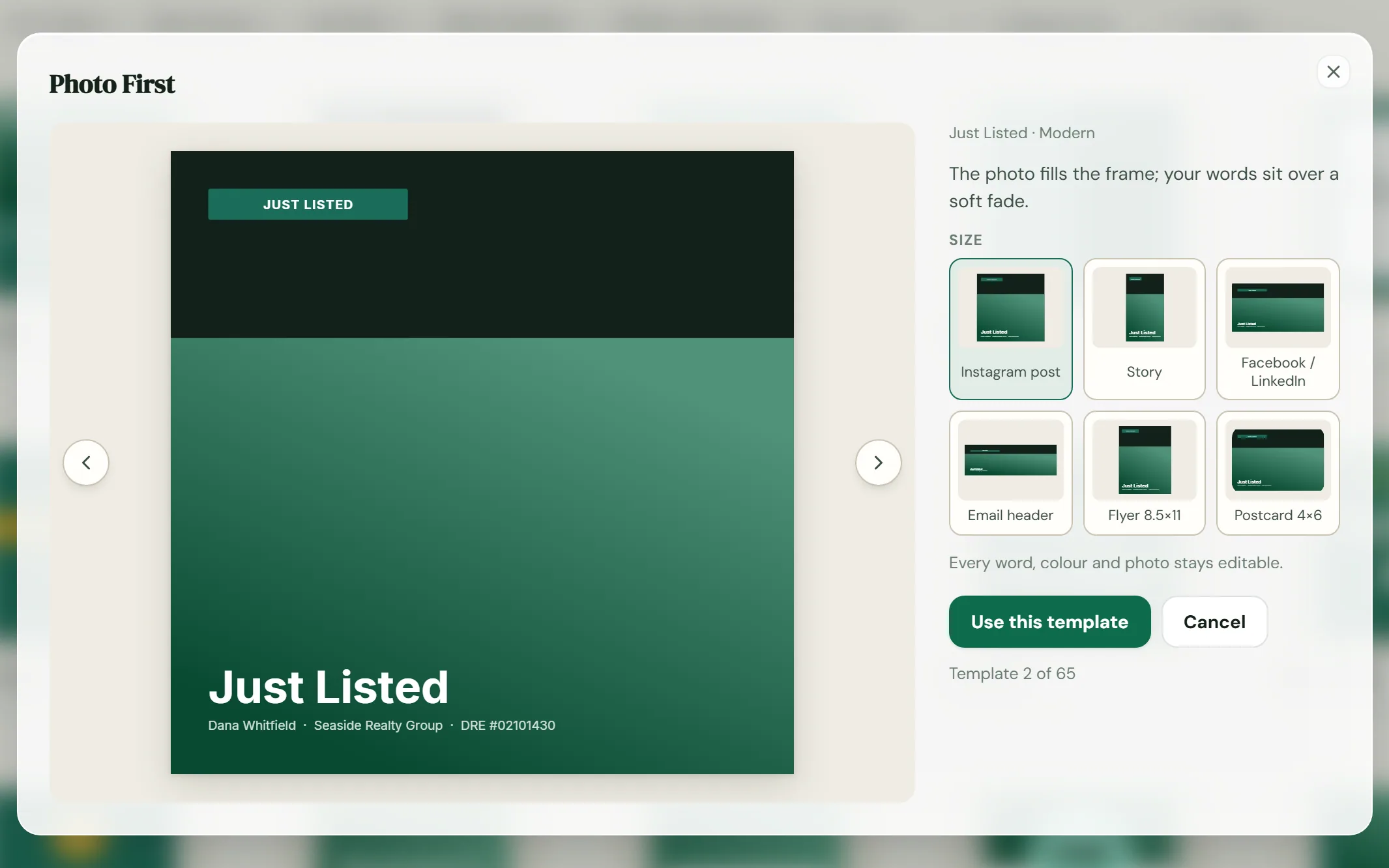
Just-listed and open house posts, flyers, postcards, email headers and seller presentations. Pick one of 65 templates, apply your brand in one click, and download it for social, print or email.
Listing marketing in minutes, already in your brand, with no other design app to pay for.
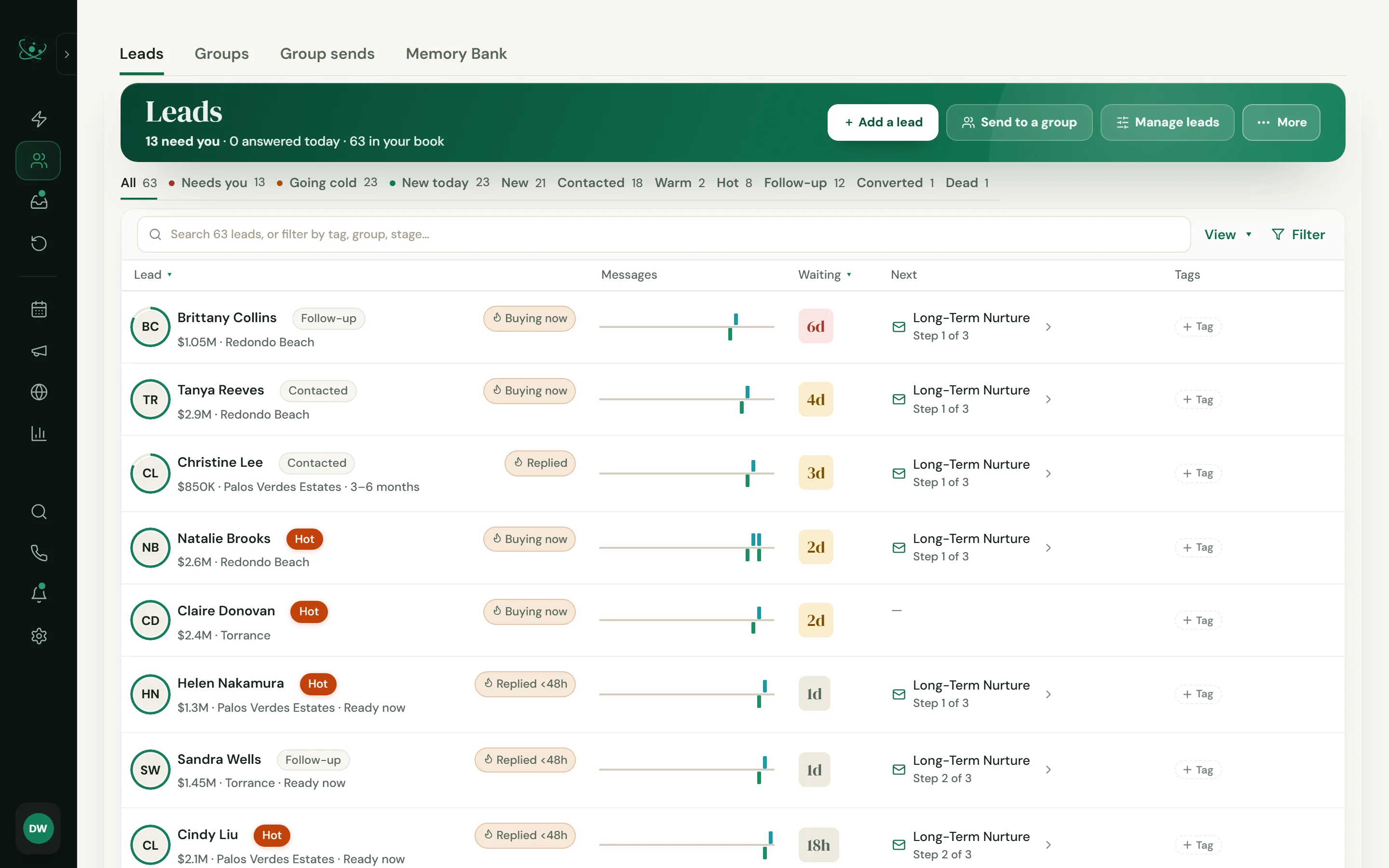
Leads, inbox, follow-up, calendar, marketing and reports, with one login and nothing to stitch together.
Who needs you, how long they've waited, and the next step for each.
Bring your Eidice into Claude and take it from there.
On Eidice AI.
One login and one record of every person, instead of a stack of apps that don't talk to each other.
Eidice does a lot, so the setup isn't left to you. On Plus and Eidice AI, our team sets everything up for you. After that, Eidice does the daily work and brings you only what needs you.
Included on Plus and Eidice AI. On Essentials it takes a few minutes, and we're one message away.
On Eidice AI, a short tone quiz and your own edits teach Eidice your greeting, your sign-off and how long your messages run. Every draft gets more like you.
Every new lead and every quiet one has its next message ready on time. Birthdays and home anniversaries get remembered. You never have to touch a setting again unless you want to. When someone wants to see a home or talk price, they come straight to you.
Help is always just a message away, on every plan. Email us anytime or book a call, and a real person helps you.
Book a setup callYour hours go to clients, not to learning and tending software.
Eidice gives brokerages an office workspace on top of each agent's own CRM. Route office leads, see who still needs a reply, and step in before a lead goes cold.
Owner, managing broker, office admin, agent, compliance officer and read-only seats, each limited to what the role allows.
Assign office leads by hand, or let Eidice balance them across the agents who are available. Each lead lands in that agent's own CRM.
Unassigned leads and missed response targets in one list. Reassign a missed lead with a reason, and the change is logged.
Leads from your website and lead providers come in through keys you can revoke, with each lead's approval to be contacted on record.
Thirty- and ninety-day results for every agent.
A departing agent's office leads hand off cleanly, ownership can pass to a new broker, and a closed office stays as a read-only archive.
No office lead sits unclaimed, and you know the moment a response target slips.
No setup fee and no contract. Every plan starts with 45 days free, and on Plus and Eidice AI we set it all up for you.
No setup fee and no contract. Buy any plan right here, or book a demo first. On Plus and Eidice AI, we set it all up for you.
No setup fee and no contract. On Plus and Eidice AI, we set it all up for you.
We walk you through Eidice with your own leads, then you use Eidice AI on email for 45 days. No card to start.
Skip the demo? Start without a card, and pick a plan on day 46.
Organize your leads and listings in one place.
The CRM, your inbox, and follow-up you write once.
Text your leads, search the MLS, and have room for everyone.
Eidice replies and follows up on its own, in your tone.
Every start is the same 45 days of Eidice AI on email. On day 46 you pick the plan you keep.
An office workspace for your brokerage and every agent in it. We set up your office for you.
Eidice writes as you, from your own email address, in your style. If a lead asks whether they're talking to AI, it answers honestly. You stay the licensed agent on every deal.
Start with Review first, where every draft waits for your tap. Price, negotiation, contract questions and showing requests always come straight to you. Every message gets a Fair Housing check and is saved on the lead's record.
No. Import a CSV from your current CRM or a spreadsheet, and try Eidice side by side. Move over when you're ready.
Not on Plus or Eidice AI. Our team sets everything up for you: we bring over your contacts, connect Gmail or Outlook, plug in your lead sources and build your follow-up plans. Then you can set it and forget it. On Essentials, setup takes a few minutes, and we're one message away if you want help.
Yes, on every plan. Help is always just a message away: email us anytime or book a call, and a real person helps you. You can also book a demo before you buy any plan.
Yes. Eidice syncs two ways with your own mailbox, so messages send from your address and replies come back to your inbox and to the lead's record.
No. Monthly plans cancel anytime and keep access through the period you paid for.
Eidice is built California-first, and MLS search uses CRMLS where your account has access. The CRM, inbox and follow-up don't depend on your MLS. MLS access must follow your license and applicable terms, including CRMLS data-license terms where that feed applies.
It's yours, and you can export it anytime. Your data and your leads' data are never used to train AI models.
Only for the features you turn on: reading and sending email in your Gmail inbox, showing your Google contacts' names and photos in your Eidice inbox and importing the ones you choose, and keeping appointments on your primary Google Calendar. To write replies, organize your mail and answer your questions about it, Eidice sends the text it needs to OpenAI. Google data is never sold, never used for ads and never used to train AI models. Section 10 of our Privacy Policy has the details.
Book a live demo and your first 45 days are free. On Plus and Eidice AI, we set everything up for you.
Start free today, or book a demo first. On Plus and Eidice AI, we set everything up for you.
Book a live demo. On Plus and Eidice AI, we set everything up for you.